YOLO Model Optimization: Achieving 2x Faster Inference on Jetson Orin AGX with TensorRT and DeepStream
We reduced PyTorch-based YOLO model inference time from 15ms to 7ms, boosting FPS from 67 to 142. This article shares our optimization journey using TensorRT and DeepStream for an automated recycled plastic sorting system.
The Problem: Racing Against Milliseconds on the Conveyor
We needed to classify plastics moving across a conveyor belt at 0.5m/s. Three types: PP (polypropylene), PS (polystyrene), and PE (polyethylene). The entire process from detection to delta robot pickup had to complete within 50ms.
We started with a PyTorch + OpenCV combination. Inference time was 15ms at 67 FPS. While this met the 30 FPS requirement, detection misses occurred when objects were densely packed. We needed faster inference.
| Item | Requirement | Initial Result |
|---|---|---|
| Target FPS | 30+ FPS | 67 FPS |
| Max Latency | Under 50ms | 15ms |
| Detection Accuracy | Over 99% | 99.2% |
| Conveyor Speed | 0.4-0.6m/s | - |
Why Jetson Orin AGX?
Essential Requirements for Edge AI
Cloud inference was not an option. Network latency alone could exceed 50ms, and network failures would halt the entire line. Edge AI with on-site inference was essential.
Why we chose Jetson Orin AGX:
| Item | Jetson Orin AGX Specifications |
|---|---|
| GPU | NVIDIA Ampere architecture, 2048 CUDA cores, 64 Tensor cores |
| AI Performance | Up to 275 TOPS (INT8) |
| CPU | 12-core Arm Cortex-A78AE |
| Memory | 64GB LPDDR5 (unified memory) |
| Power Consumption | 15W - 60W (configurable) |
| Size | Compact module form factor |
Industrial Environment Suitability
| Requirement | Jetson Orin AGX |
|---|---|
| Real-time Processing | High-speed inference with 275 TOPS AI performance |
| Compact Installation | Small form factor for easy on-site installation |
| Heat/Power | Fanless or small heatsink operation, low power |
| Reliability | Industrial temperature range support (-25C to 80C) |
| Network Independence | Local inference unaffected by network failures |
Advantages of Unified Memory Architecture
Standard desktop GPUs have separate CPU and GPU memory. Processing data on the GPU requires CPU-to-GPU copying, which becomes a bottleneck.
Jetson uses Unified Memory Architecture. The CPU and GPU share the same physical memory, enabling direct access without data copying.
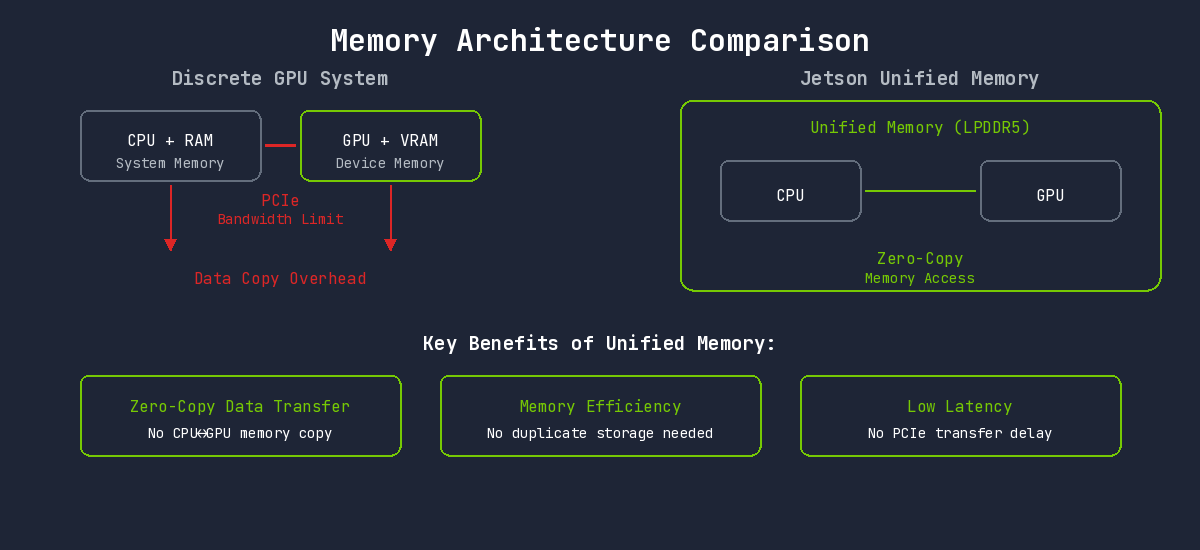
This architecture enables:
- Zero-Copy Data Transfer: Camera frames can be processed directly on GPU without copying
- Memory Efficiency: No need for duplicate data storage across CPU/GPU
- Low Latency: No PCIe transfer delays
TensorRT: Inference-Optimized Engine
PyTorch Limitations
Using PyTorch-trained models directly for inference introduces overhead:
- Dynamic computation graph construction overhead
- Python GIL (Global Interpreter Lock) impact
- Dynamic memory allocation
TensorRT leverages the fact that model structure is fixed. All optimizations are performed at compile time, and runtime executes pure computation only.
Key Optimization Techniques
1. Layer Fusion
Each layer in a deep learning model runs as a separate CUDA kernel. Each kernel involves GPU memory read/write operations and kernel launch overhead.
TensorRT fuses consecutive layers into a single kernel:
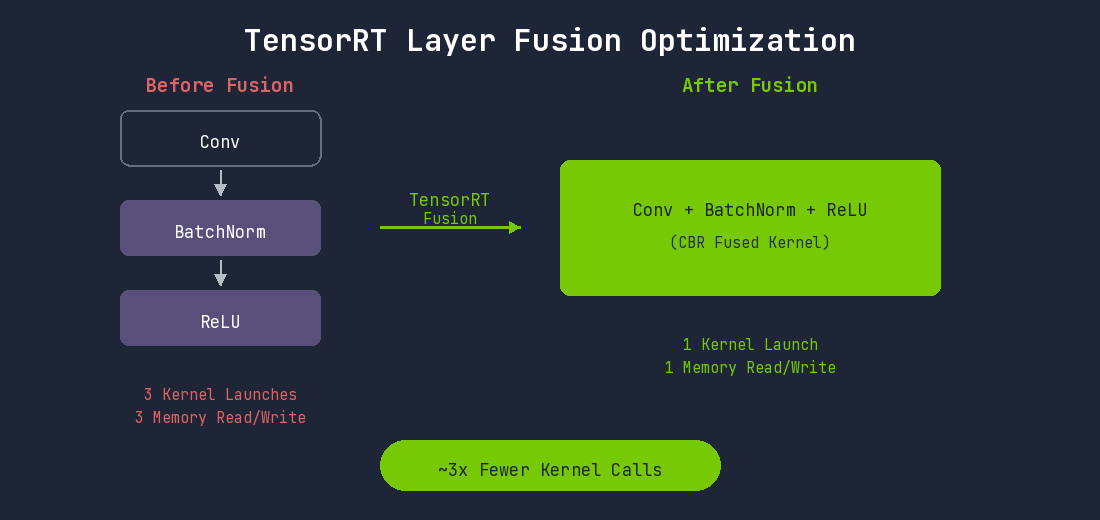
The Convolution-BatchNorm-SiLU pattern repeats dozens of times in YOLO models. Fusing all these patterns significantly reduces kernel execution count.
2. Precision Calibration
Training uses FP32, but inference often works well with lower precision.
Jetson Orin's Ampere GPU accelerates FP16 and INT8 operations at the hardware level through Tensor Cores.
| Mode | Advantages | Disadvantages | Recommended Use Case |
|---|---|---|---|
| FP32 | No accuracy loss | No Tensor Core usage, slow | Debugging or accuracy verification |
| FP16 | Tensor Core usage, 2x+ faster, half memory | Very rare accuracy loss | Jetson default recommendation |
| INT8 | Maximum performance, optimal Tensor Core usage | Calibration required | Speed-critical applications |
INT8 requires a Calibration process. Representative datasets are passed through the model to analyze activation value distributions at each layer and determine optimal scaling factors.
3. Kernel Auto-Tuning
The optimal CUDA kernel implementation varies based on GPU architecture, input size, and batch size for the same operation. TensorRT actually runs various kernel implementations during engine build and selects the fastest one for the current environment.
Important: TensorRT engines are environment-specific. The engine must be built directly on the Jetson Orin AGX.
4. Dynamic Tensor Memory
Intermediate tensors during inference can have their memory freed once they are no longer needed by subsequent layers. TensorRT analyzes tensor lifecycles to efficiently reuse memory. This optimization is particularly important in Jetson's constrained memory environment.
TensorRT Conversion Workflow
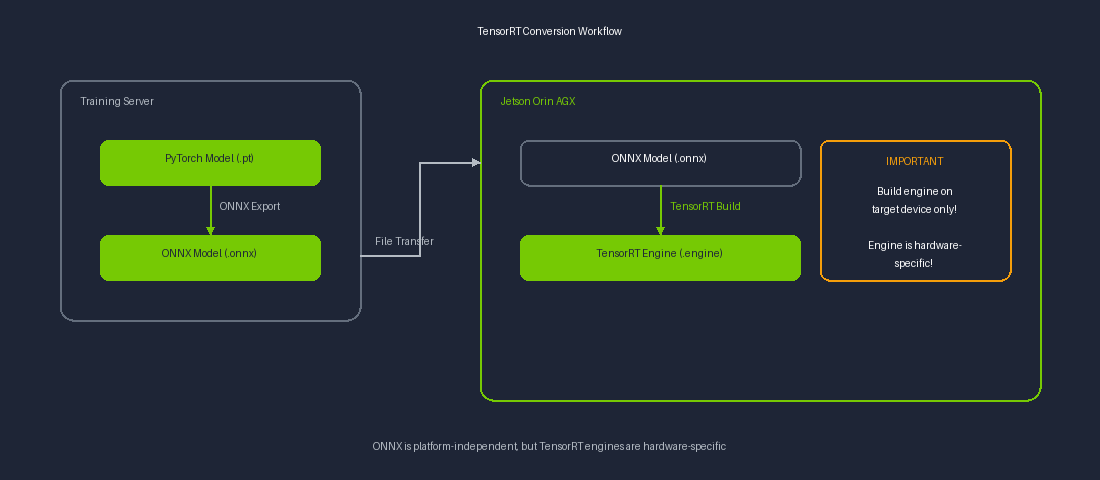
ONNX files are platform-independent and can be exported on a server, but TensorRT engine building must be performed on the target device (Jetson).
DeepStream: End-to-End Video Processing Pipeline
Bottlenecks in Traditional Approach
Comparing the problems with Python + OpenCV + PyTorch pipeline and DeepStream's solutions:
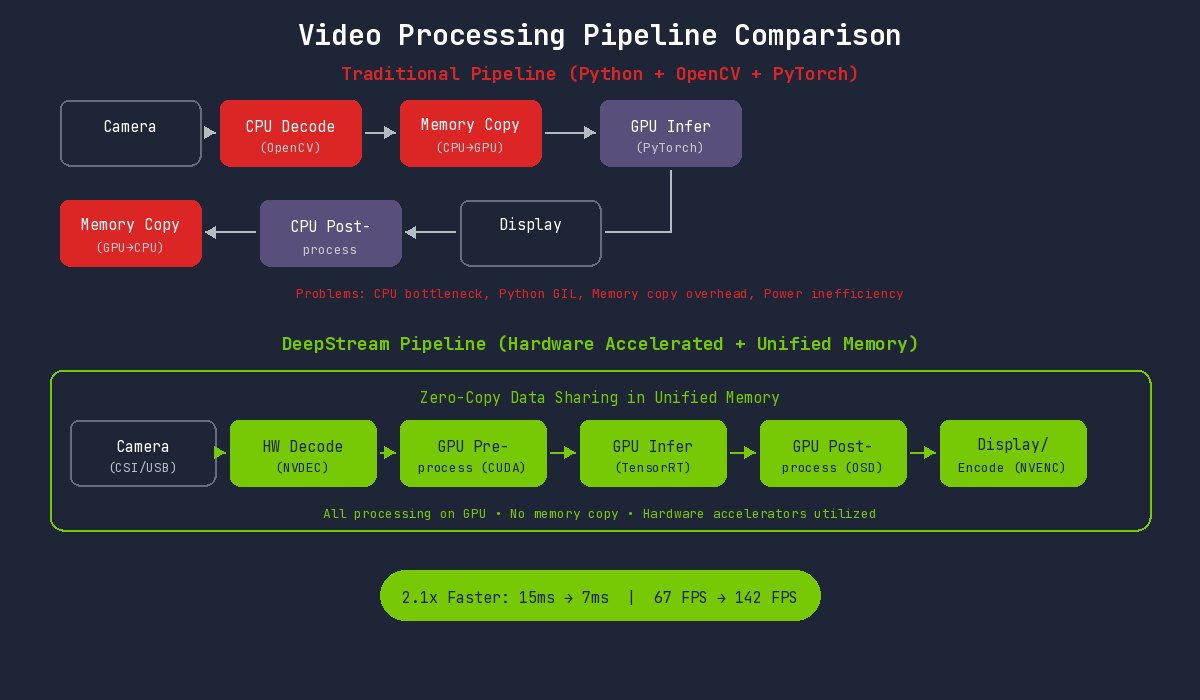
Issues with the traditional approach on Jetson:
- CPU Decoding Bottleneck: ARM CPU has limited decoding performance compared to desktop
- Python Overhead: GIL and interpreter overhead
- Inefficient Memory Usage: Fails to leverage unified memory advantages
- Power Waste: CPU-intensive operations reduce power efficiency
DeepStream's Solution
DeepStream maximizes utilization of Jetson's unified memory and hardware accelerators. All processing occurs on the GPU, and hardware accelerators work seamlessly without memory copying.
Jetson-Specific Hardware Accelerator Utilization
Jetson Orin AGX has several built-in hardware accelerators beyond the GPU:
| Hardware | Role | DeepStream Usage |
|---|---|---|
| NVDEC | Video decoding | H.264/H.265 hardware decoding |
| NVENC | Video encoding | Result video saving/streaming |
| VIC | Vision Image Compositor | Image resize, color conversion |
| DLA | Deep Learning Accelerator | Additional AI inference (GPU offload) |
DeepStream automatically utilizes all this hardware to distribute GPU load.
Multi-Stream Processing
A single DeepStream pipeline can process multiple camera streams simultaneously. Combined with Jetson's power efficiency, you can build multi-camera systems with low power consumption.
DLA (Deep Learning Accelerator) Utilization
Jetson Orin AGX has 2 built-in DLAs. DLA operates independently of the GPU as an AI accelerator. Running certain layers on DLA frees GPU resources for other tasks.
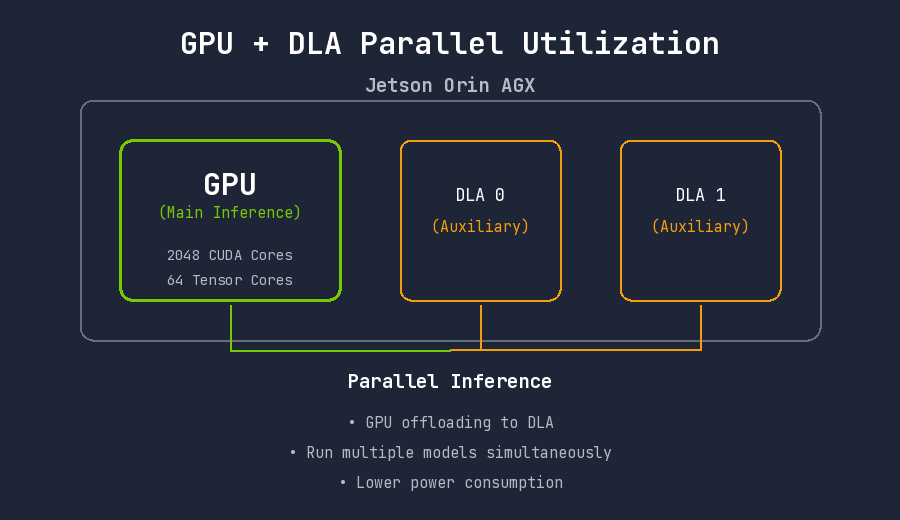
Checking DLA support:
/usr/src/tensorrt/bin/trtexec \
    --onnx=yolo.onnx \
    --useDLACore=0 \
    --allowGPUFallback \
    --fp16
DeepStream Pipeline Structure
Built on a GStreamer-based plugin system:
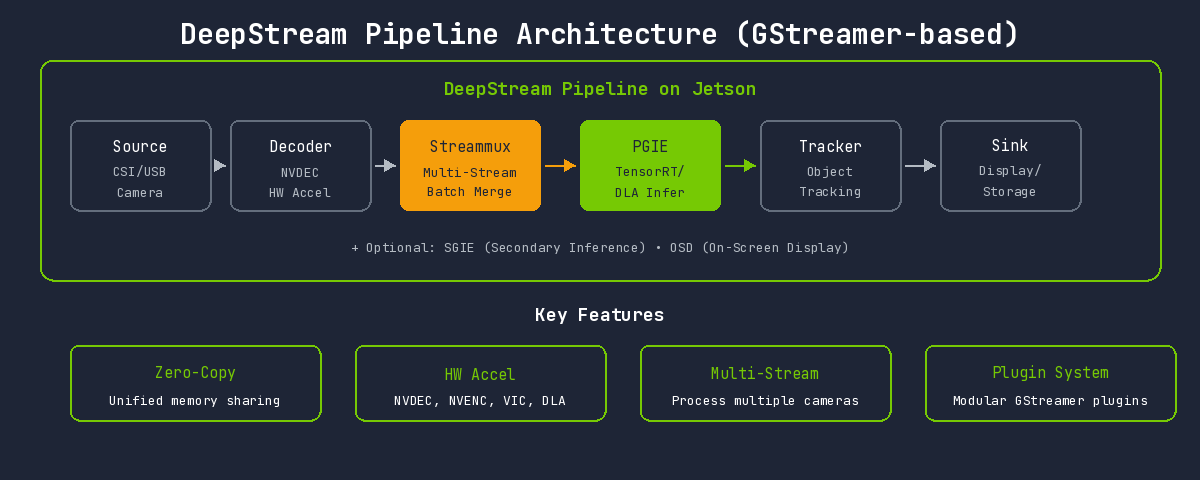
| Element | Role | Jetson-Specific Features |
|---|---|---|
| Source | Input source | Direct CSI camera connection support (nvarguscamerasrc) |
| Decoder | Video decoding | NVDEC hardware acceleration (nvv4l2decoder) |
| Streammux | Stream multiplexer | Efficient batch composition in unified memory |
| PGIE | Primary GPU Inference | TensorRT + DLA selectable |
| SGIE | Secondary Inference | DLA available for secondary classification |
| Tracker | Object tracking | GPU-accelerated trackers (NvDCF, IOU, etc.) |
| OSD | On-Screen Display | GPU-based overlay rendering |
| Sink | Output | nvoverlaysink (Jetson display optimized) |
Case Study: Plastic Sorting System
Technical Challenges
We needed to classify plastics in real-time on a conveyor belt at a recycling facility and send signals to an automated sorting system. Based on classification results, a delta robot separates plastics into appropriate collection bins.
- Low Latency: Fast conveyor speed requires minimal delay from detection to robot action
- High Throughput: All objects must be detected even when densely packed
- Lighting Variation Handling: Industrial lighting conditions are inconsistent
- Similar Appearance: PP, PS, and PE are often difficult to distinguish visually
- Edge Resource Constraints: Target performance must be achieved within limited computational resources
Performance Comparison Results
Experimental Environment
| Item | Specification |
|---|---|
| Device | NVIDIA Jetson Orin AGX 64GB |
| JetPack | 6.0 |
| TensorRT | 8.6.2 |
| DeepStream | 6.4 |
| Model | YOLOv8s |
| Input Resolution | 640x480 |
| Power Mode | MAXN (60W) |
Inference Speed Comparison
| Environment | Inference Time | FPS | Speed Improvement |
|---|---|---|---|
| PyTorch (Python, FP32) | 15ms | 67 fps | Baseline |
| TensorRT (Python, FP16) | 7ms | 142 fps | 2.1x |
Accuracy Comparison
Accuracy changes with precision conversion:
| Environment | mAP@0.5 | mAP@0.5:0.95 | Accuracy Change |
|---|---|---|---|
| PyTorch (FP32) | 99.2% | 87.5% | Baseline |
| TensorRT (FP16) | 99.1% | 87.3% | -0.1% |
| TensorRT (INT8) | 98.9% | 86.1% | -0.3% |
FP16 conversion results in only 0.1% accuracy loss, which is practically negligible.
Per-Class Detection Performance
| Class | Precision | Recall | AP@0.5 |
|---|---|---|---|
| PP (Polypropylene) | 99.3% | 98.9% | 99.1% |
| PS (Polystyrene) | 98.8% | 99.2% | 99.0% |
| PE (Polyethylene) | 99.1% | 99.4% | 99.3% |
Test Conditions
- Test Period: 2 weeks continuous operation
- Training Images: Approximately 800,000
- Conveyor Conditions: Approximately 0.5m/s
Insights from the Optimization Process
TensorRT Conversion Considerations
1. Always Build the Engine on Jetson
TensorRT engines are hardware-dependent. Engines built on a server will not work on Jetson.
2. Dynamic Shape vs Static Shape
In Jetson's constrained memory environment, Static Shape is more efficient. Fixed input sizes optimize memory allocation.
3. Consider DLA Utilization
Running some layers on DLA can save GPU resources. However, not all layers support DLA, so compatibility verification is necessary.
DeepStream Implementation Considerations
1. Jetson Power Mode Settings
Jetson Orin AGX supports multiple power modes:
# Maximum performance mode
sudo nvpmodel -m 0  # MAXN mode

# Check power mode
nvpmodel -q
2. Tracker Selection
| Tracker | Characteristics | Jetson Suitability |
|---|---|---|
| IOU Tracker | Simple and fast | Highly suitable (low overhead) |
| NvDCF | GPU accelerated, high accuracy | Suitable (uses additional GPU resources) |
| DeepSORT | Re-ID based | Caution (requires additional model, resource intensive) |
In conveyor environments, object movement direction is consistent, so IOU Tracker was sufficient.
Conclusion
Quantitative Results
| Metric | PyTorch Baseline | After Optimization | Improvement |
|---|---|---|---|
| Inference Speed | 15ms | 7ms | 46% reduction |
| FPS | 67 fps | 142 fps | 215% improvement |
| Accuracy (mAP@0.5) | 99.2% | 99.1% | -0.1% (negligible) |
Qualitative Results
- Edge-Independent Operation: Fully autonomous on-site operation without network dependency
- Improved Stability: Freedom from Python environment memory leaks and GIL issues
- Power Efficiency: Low-power operation
- Easy Maintenance: Configuration file-based pipeline makes model replacement simple
Key Takeaways
-
Jetson is not a server: Code and models that work on servers will not perform well as-is. Optimization for the Jetson environment is essential.
-
Leverage unified memory: Jetson's biggest advantage, unified memory, pairs well with zero-copy pipelines like DeepStream.
-
Utilize all hardware accelerators: Leverage not just the GPU, but also NVDEC, NVENC, and DLA for excellent end-to-end performance.
-
Set power mode appropriately: MAXN mode is not always optimal. Consider heat and power constraints. However, in our project, MAXN mode ran without issues even during extended operation in a hot waste processing facility during summer.
Jetson Orin AGX proved to be a suitable platform for industrial environments requiring real-time AI inference at the edge. Through TensorRT and DeepStream, we achieved near-server-level performance within constrained resources. Its value particularly shone in environments like conveyor plastic sorting where both latency and throughput are critical.